sweettoof.com ART - RenderDrive 3D rendering appliances, PURE accelerated ray traced 3D rendering PCI board
ART VPS Monday 13 February 2006Monday 13 February 2006Monday 13 February 2006Monday 13 February 2006
About UsProductsBenchmarksNews & EventsGalleryClientsSupportDownloadsWeb StoreContact Us
PURE
RenderDrive
PURE is something most, if not all, 3D artists have dreamed of: fast, superb render quality and at an affordable price.

- , 3D World Magazine
Click here for Legal Disclaimer
Product Information
RenderDrive
Ray Tracing
Ray tracing is a type of rendering based on the physical processes that occur in the real world. Images are generated by calculating the path of light through a scene and into the camera. Each pixel is produced by calculating the behavior of a number of light rays from different points over the area covered by that pixel. Therefore images rendered by the ray tracing method are highly photorealistic and of excellent quality.

Ray tracing is very computationally expensive, so with current software ray tracers running on conventional, general-purpose processors, it takes a long time to render.

RenderDrive uses specially designed processors providing raw performance to speed up the ray tracing process. RenderDrive is the only rendering solution to hardware-accelerate ray traced rendering. RenderDrive also enhances efficiency by assessing each frame for its ray depth requirements. RenderDrive therefore produces images far faster than a software ray tracer, and with quality and realism far beyond anything achievable with any other renderer.

RenderDrive truly mimics the way light behaves in the real world, while providing a simple user interface and delivering raw processing performance.

Supported Features
Physical Accuracy
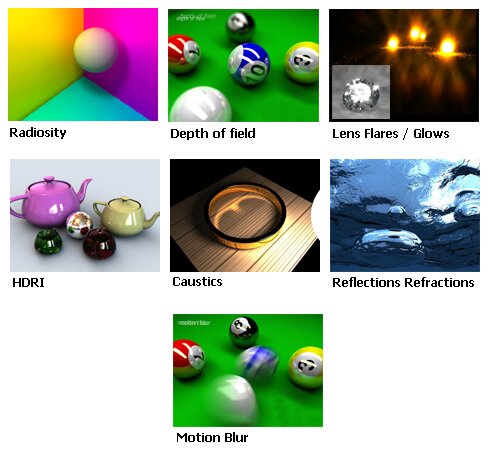
RenderDrive accurately obeys the physical laws of light, reflection, refraction, shadows and lens properties. With this uncompromising environment, scene building and visualization becomes a highly predictable and controllable process, eliminating the need for traditional workarounds, such as shadow mapping, reflection mapping and post-processed lens effects.

RenderDrive provides a physically accurate environment to create convincingly real images ... or convincingly unreal ones!

Lighting & Secondary Illumination
 Real-world lighting and shadows are fundamental to rendering scenes that ring true, whether they are designed to simulate reality or create fantastic new worlds. RenderDrive's lights are sizeable to become area lights, which provide light sources that naturally create soft shadows. By default RenderDrive's lights obey the inverse square law and so behave in a predictable and convincing manner.

As in the real world shadows cast by area lights soften and weaken the further they are from the shadow-casting object. RenderDrive's lighting gives a natural and controllable result, enabling accurate and realistic representations of simple or complex lighting environments.

Use IES light fixtures within your scenes. RenderDrive will simulate these fixtures accurately according to the manufacturers specification.

But it's not just direct lighting and physically accurate soft shadows that create a real lighting scheme. The ART VPS RP-SSI (Selective Secondary Illumination) shader delivers unique user-selective control of indirect illumination within a scene. Using RenderDrive's powerful processing platform, you can now achieve soft and natural lighting, dramatic and moody lighting, or whatever lighting scheme you need.

Accurate Materials
In addition to supporting the standard materials of the 3D application, and being compliant with the RenderMan Shading Language, RenderDrive comes with a library of physically-based RenderCoat materials. These RenderCoat materials take a physical approach to sophisticated surface materials such as glass, ceramics, and metals and are tuned to take advantage of RenderDrive's accelerated ray tracing architecture.

With the RenderCoat materials, a more accurate and realistic representation of a design can be created.

Camera Effects
In film and photography the camera plays a central role in the creation of great and appealing images. Control over focal length, aperture, lens selection and shutter speed all provide a predictable set of parameters upon which a high degree of creativity can be based.

RenderDrive recreates this set of tools accurately within your 3D application. Camera parameters have the same effects on depth of field and motion blur as in the real world. Lens flares are generated in the lens of the camera according to brightness values within the scene and a single render pass will generate lens effects quickly and according to real world parameters.

RenderDrive's depth of field, calculated from the camera's properties, is based on physically real parameters, allowing highly intuitive camera control and accurate results.

Job Queue
In a busy studio, or one with multiple users requiring images to be rendered, it is important to be able to efficiently manage the all the rendering tasks. RenderDrive's job control is accessed through any web browser - just point a browser, such as Internet Explorer, at RenderDrive's network address. This web-based approach enables the appliance to be monitored from any computer on your network, and makes it simple to monitor rendering from remote locations.

You can monitor rendering progress, change the order of rendering tasks, check the status of the RenderDrive system and control a range of other administration tasks.

With RenderDrive's built-in reliability and efficient job queue control, rendering productivity is maximised.

Interfaces
A range of plug-in interfaces are available. Read about them here, or click on the banner below to Download evaluation copies of the software plug-ins.

Download the ART VPS RenderPipe Experience